
Your Nuvio plan, the free trial and payment
Standard or Premium, the prices, paying on pro.nuvio.ro or through the App Store, cancelling, free days and invoices.
The app screens shown here are in Romanian; each button's Romanian name follows it in brackets.
Prices
What Standard and Premium cost on pro.nuvio.ro and through the App Store.
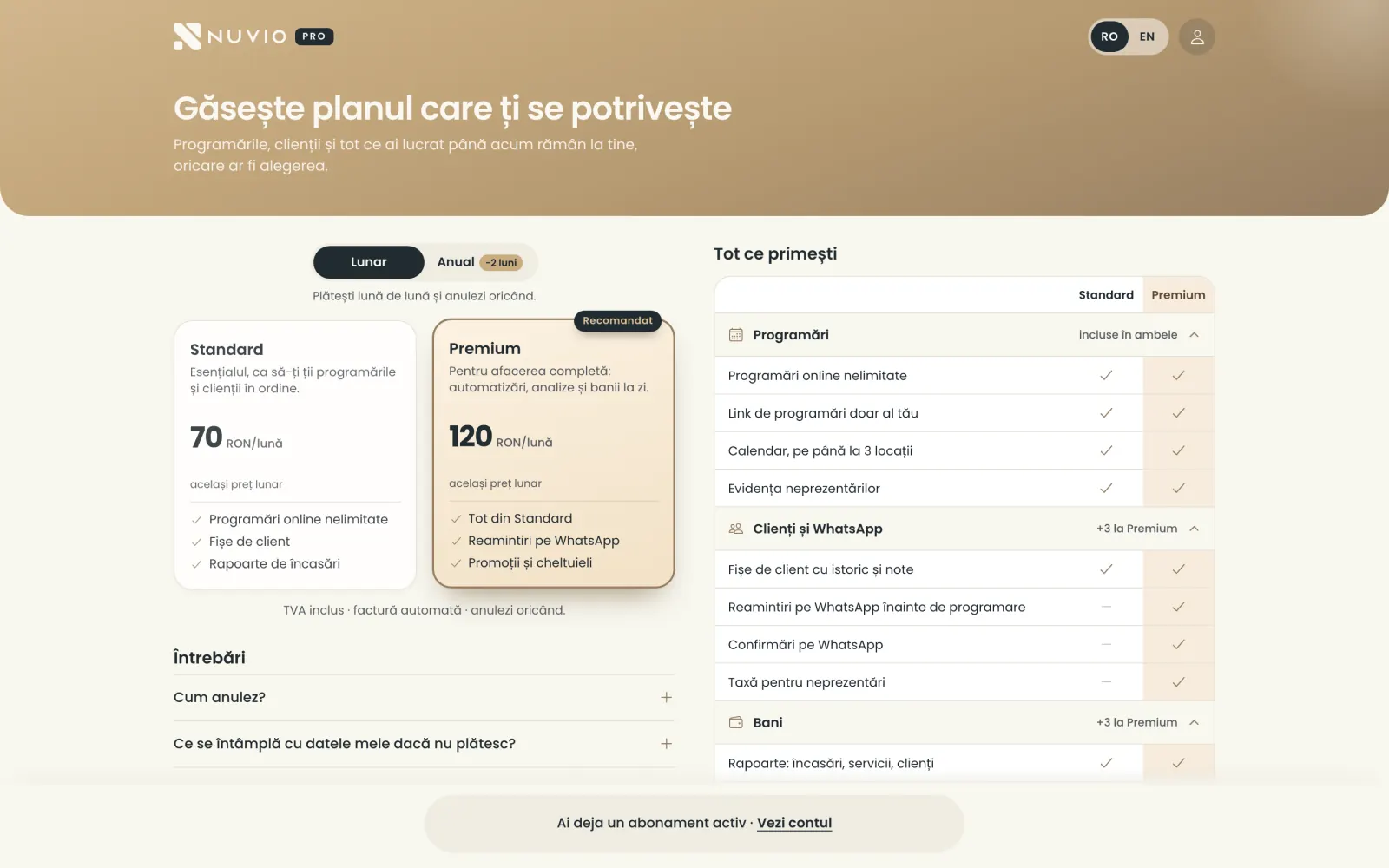
70 RON (Standard) or 120 RON (Premium) a month, 700 RON or 1,200 RON a year, VAT included, paying by card on pro.nuvio.ro.
Through the App Store the plan costs 100 RON (Standard) or 170 RON (Premium) a month.
Paying by card, you get the invoice automatically, by e-mail, with every payment.
The free trial
You start with 14 days of everything in Premium, with no card.
The trial's steps and rules are in Getting started.
Before it ends we ask how you found it; if you answer the questionnaire, you get 7 more days.
Pay on pro.nuvio.ro
Choose the plan and pay by card, monthly or yearly, on pro.nuvio.ro.
Where to find it:pro.nuvio.roPlans (Planuri)
- Sign in on pro.nuvio.ro with the same e-mail as in the app.
- You get a code by e-mail and type it on the page.
- Open Plans (Planuri) and choose Monthly (Lunar) or Yearly (Anual).
- Choose Standard or Premium and pay by card.
The plan starts at once, in the app too.
Pay through the App Store
On an iPhone you can pay for the plan in the app, through the App Store.
- In the app, open the plans and choose Standard or Premium.
- Confirm the payment with your Apple ID.
You stop an App Store plan from the iPhone Settings, under Subscriptions.
Move to the pro.nuvio.ro price
- Turn off the renewal in the iPhone Settings, under Subscriptions.
- When the period paid to Apple ends, pay on pro.nuvio.ro.
If you pay on pro.nuvio.ro while the App Store plan is active, the web payment starts only when the Apple one ends.
Cancel your plan
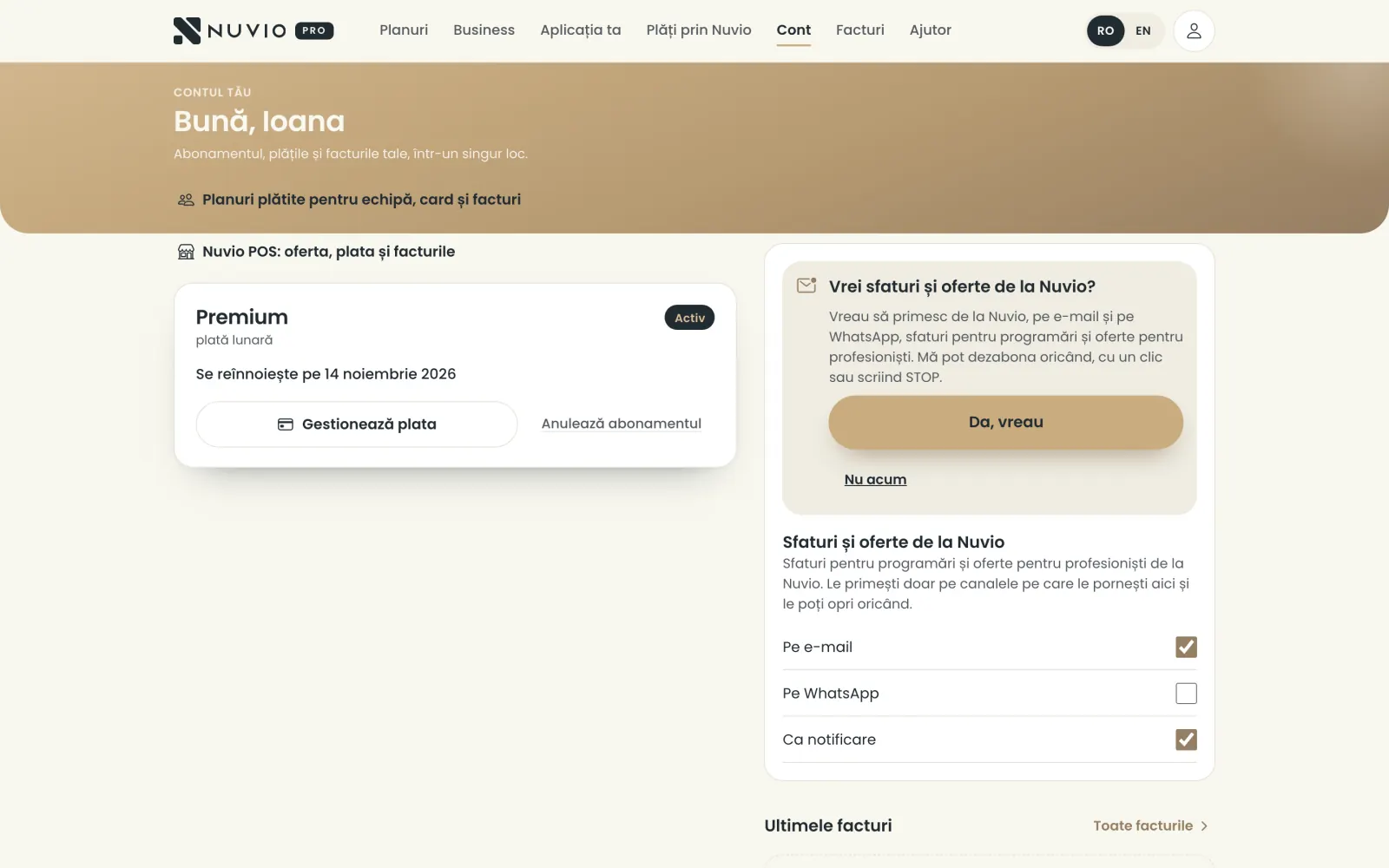
Cancel the plan on pro.nuvio.ro; it stays active until the end of the paid period.
Where to find it:pro.nuvio.roAccount (Cont)Cancel subscription (Anulează abonamentul)
- Sign in on pro.nuvio.ro and open Account (Cont).
- Tap Cancel subscription (Anulează abonamentul).
- Choose the reason and tap Next (Mai departe).
- Tap Cancel anyway (Anulează oricum), or Keep my subscription (Păstrez abonamentul) if you changed your mind.
If you pay through the App Store, pro.nuvio.ro shows Manage in the App Store (Gestionează în App Store).
What stops
What happens to your account when you move to Standard or when the plan expires.
- Premium to Standard
- Promotions stop, and WhatsApp reminders and campaigns stop too.
- The plan expires
- The account stays, with bookings and clients, but you can only view it until you pay again.
- The business
- Stays active while the owner has Premium or the business pays plans for the team.
Free days and months
Extra days for the questionnaire, free months from Nuvio and partner access.
Where to find it:Settings (Setări)My account (Contul meu)
- Questionnaire (Chestionar)
- At the end of the free trial, 7 more days for a few answers.
- Free months
- Months given by Nuvio, for example when you move from another paid app.
- Days from recommendations
- Free days for colleagues who signed up with your link.
- Partner
- You use Nuvio Pro for free, as a partner; if the partnership stops, you have 14 more days.
What you got and until when shows in My account (Contul meu), under Subscription (Abonament).
If you pay during free days, the payment starts only when they end.
Recommend Nuvio
For each colleague who signs up with your link and pays their first invoice, you get a free month.
Where to find it:Settings (Setări)Recommend Nuvio (Recomandă Nuvio)
- Open Recommend Nuvio (Recomandă Nuvio).
- Tap Copy the link (Copiază linkul) or Share (Trimite) and send it to colleagues.
Your colleague gets a longer free trial if they sign up with your link or code.
You see how many colleagues signed up, how many paid and how many months you earned.
Partnership for academies and trainers
Partner academies and trainers have a Nuvio code for their students and monthly statements on pro.nuvio.ro.
Where to find it:pro.nuvio.roPartnership (Parteneriat)
On pro.nuvio.ro/parteneriat you see your code, the colleagues who signed up with it and the monthly statements.
To become a partner, write to us at office@dotkoda.com.
Invoices from Nuvio
All your plan's invoices are on pro.nuvio.ro, ready to download.
Where to find it:pro.nuvio.roInvoices (Facturi)
- Sign in on pro.nuvio.ro and open Invoices (Facturi).
- Tap an invoice to download it.
For the App Store, Apple sends the invoice, to your Apple ID e-mail.
Updated on
Help
If the answer is not here, write to us on WhatsApp or by e-mail.