
Business: the SMS phone (Nuvio SMS)
Reminders and confirmations go out by SMS from an Android phone at the location, with its own SIM.
The app screens shown here are in Romanian; each button's Romanian name follows it in brackets.
What the SMS phone does
Clients without the Nuvio app get the booking reminder and confirmation by SMS, from the location's number.
Where to find it:Messages and growth (Mesaje și creștere)SMS phone (Telefon SMS)
Clients with the app keep getting the notification in the app.
SMS messages go out between 08:00 and 22:00; a reminder that would fall at night goes out earlier, never later.
The SMS cost is whatever your SIM plan charges.
What you need
An Android phone, the business's SIM and internet on the phone.
- Android phone
- It can be the location's everyday phone; it doesn't need to stay on the charger.
- SIM
- SMS messages go out from its number, on its plan.
- Internet
- Wi-Fi or mobile data, so the phone learns what to send.
An iPhone cannot send SMS automatically, which is why the app exists only for Android.
Download the Nuvio SMS app
You download the app from us, at app.nuvio.ro/sms, not from Google Play.
- On the location's Android phone, open app.nuvio.ro/sms.
- Tap Download the app (Descarcă aplicația).
- Open the downloaded file.
- If the phone asks, tap Settings and turn on Allow from this source.
- Tap Install, then Install anyway if a warning appears.
Google Play doesn't allow apps that send SMS automatically, so you download it directly from Nuvio.
Connect the phone
You link the phone to the business with a QR code shown in Nuvio Pro.
Where to find it:Messages and growth (Mesaje și creștere)SMS phone (Telefon SMS)Connect a phone (Conectează un telefon)
- In Nuvio Pro, open SMS phone (Telefon SMS) and tap Connect a phone (Conectează un telefon).
- Type a name for the phone, for example Front desk phone.
- On the Android phone, scan the code with the camera or type it in the Nuvio SMS app.
- Follow the steps in the app; at the end the phone sends a test SMS.
In Nuvio Pro, the phone shows as connected as soon as you finish the steps.
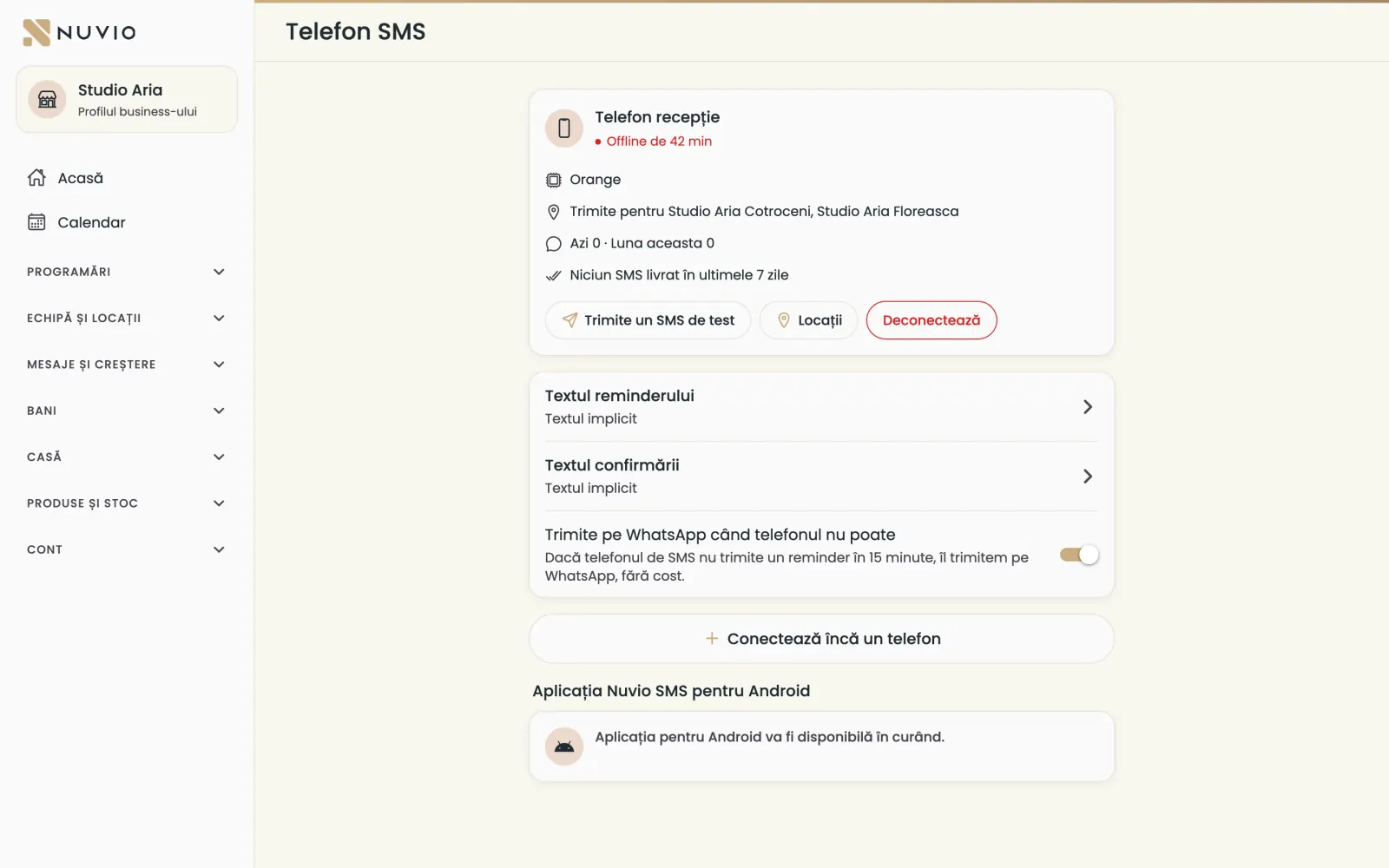
The phone's status
See whether the phone answers and how many SMS messages it sent today and this month.
- Being set up on the phone (Se configurează pe telefon)
- The steps in the Nuvio SMS app are not finished.
- Connected
- The phone answers and sends.
- No signal
- The phone hasn't checked in; you get a notification and reminders can go out on WhatsApp.
We also tell you when the phone is too hot, has no signal or is in airplane mode.
Send a test SMS
Check that the phone sends, with an SMS to your own number.
Where to find it:Messages and growth (Mesaje și creștere)SMS phone (Telefon SMS)Send a test SMS (Trimite un SMS de test)
- Tap Send a test SMS (Trimite un SMS de test).
- Type your phone number and send.
The phone's locations
Choose which locations each phone sends for, if you have several.
Where to find it:Messages and growth (Mesaje și creștere)SMS phone (Telefon SMS)Locations (Locații)
- Tap the phone, then Locations (Locații).
- Tick the locations and save.
With Connect another phone (Conectează încă un telefon) you add a phone for another location or as a backup.
The SMS texts
Write the reminder and confirmation texts, with the booking details filled in automatically.
Where to find it:Messages and growth (Mesaje și creștere)SMS texts (Textele SMS-urilor)
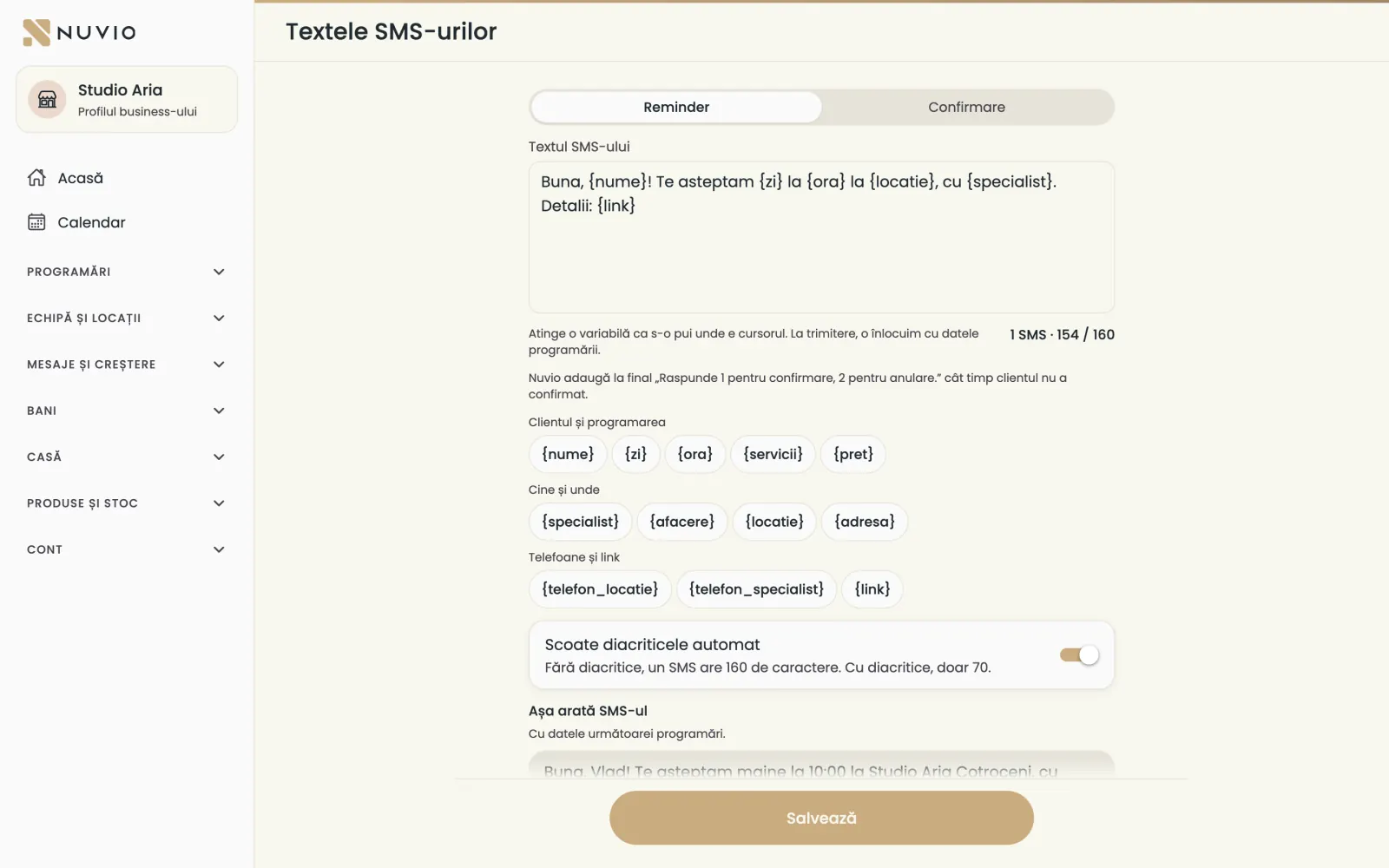
- Open SMS texts (Textele SMS-urilor) and choose Reminder or Confirmation (Confirmare).
- Write the text and tap a variable, for example name or time, to put it at the cursor.
- Check how the SMS looks in the example below.
- Tap Save (Salvează).
- Remove diacritics automatically (Scoate diacriticele automat)
- Without diacritics an SMS has 160 characters; with diacritics only 70.
- The counter
- Shows how many SMS messages the text makes and how many characters are left.
- Send me a test (Trimite-mi un test)
- You get the text on your phone, with the next booking's details.
- Back to the default text (Revino la textul implicit)
- Puts back the text written by Nuvio.
WhatsApp as a backup
If the phone doesn't send the reminder within 15 minutes, we send it on WhatsApp.
Where to find it:Messages and growth (Mesaje și creștere)SMS phone (Telefon SMS)Send on WhatsApp when the phone can't (Trimite pe WhatsApp când telefonul nu poate)
- Turn on Send on WhatsApp when the phone can't (Trimite pe WhatsApp când telefonul nu poate).
This way the client gets the reminder even when the phone is flat or has no signal.
Client replies
The client replies to the SMS with 1 to confirm or 2 to cancel.
- 1
- The booking shows Coming (Vine).
- 2
- The booking is cancelled if it is still within the free cancellation time and not paid.
- Other text
- You get the client's message as a notification.
Nuvio adds the reply line at the end of the SMS while the client hasn't confirmed.
Disconnect the phone
Disconnect a phone, for example when you replace it.
Where to find it:Messages and growth (Mesaje și creștere)SMS phone (Telefon SMS)Disconnect (Deconectează)
- Tap the phone and then Disconnect (Deconectează).
- Confirm.
For the new phone, tap Connect a phone (Conectează un telefon) and repeat the steps.
Independent specialists
Commission and chair-rent collaborators keep their own reminders.
The SMS phone sends for the employees' bookings at the business's locations.
Collaborators send their reminders as before, from their own app.
Updated on
Help
If the answer is not here, write to us on WhatsApp or by e-mail.